
Register as a Client
- Click on the “Request a Service” button on the top right-hand corner of Kolabtree.com home page.
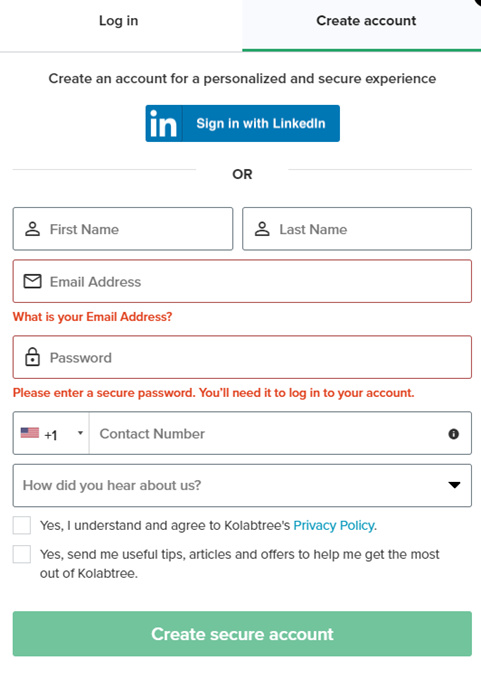
- You may choose to Sign in with LinkedIn, which will use your LinkedIn account details, if not, please fill the relevant boxes with First Name, Last Name. Email address and Password.
- We'd also like to know how you learned about us so that we can focus our efforts in the proper direction. Select “Create Account”.
- After successful registration, you will be redirected to the Kolabtree.com dashboard. To hire an expert, simply click "Create Project".
- A new client will be taken to "Create a new Project" Tab. After becoming a Project Owner, the dashboard will display all of your projects.
Register as an Expert
- Click on the “Join as Expert” button on the top right-hand corner of Kolabtree.com home page.
- You may choose to Sign in with LinkedIn, which will use your LinkedIn account details, if not, please fill the relevant boxes with First Name, Last Name. Email address and Password.
- We'd also like to know how you learned about us so that we can focus our efforts in the proper direction. Select “Create Account”.
- After successful registration as an Expert, you will be taken to "Profile" tab. A comprehensive profile page might boost your chances of getting hired as a freelancer.
Was this article helpful?
That’s Great!
Thank you for your feedback
Sorry! We couldn't be helpful
Thank you for your feedback
Feedback sent
We appreciate your effort and will try to fix the article